
Vue组件通信与组件传值
🍓总结
JS
🍓父子通信
(1)
父=> 子传递数据(props)
子=> 父( events(emit))

(2)
ref和$parent/$children
父=> 子传递数据(ref)
子=> 父( $parent/$children)

(3)
provide/inject
父=> 子传递数据(provide)
子=> 父( inject)

(4)
attrs/$listeners
父=> 子传递数据(attrs)
子=> 父( $listeners)

🍓兄弟组件通信
(1)
eventBus($emit/$on)
❤Vue2组件传值
1、父子组件传值(Props和$emit)
👉父组件
javascript
<template>
  <child-component :message="parentMessage" @update="handleUpdate"></child-component>
</template>

<script>
import ChildComponent from './ChildComponent.vue';

export default {
  data() {
    return {
      parentMessage: 'Hello from Parent'
    };
  },
  methods: {
    handleUpdate(value) {
      console.log('Updated:', value);
    }
  },
  components: {
    ChildComponent
  }
};
</script>
👉子组件
javascript
<template>
  <div>
    <p>{{ message }}</p>
    <button @click="sendUpdate">Send Update</button>
  </div>
</template>

<script>
export default {
  props: ['message'],
  methods: {
    sendUpdate() {
      this.$emit('update', 'New value from Child');
    }
  }
};
</script>
2、父子组件传值eventBus($emit/$on)
通过一个空的Vue实例作为中央事件总线(事件中心),用它来触发事件和监听事件,巧妙而轻量地实现了任何组件间的通信,包括父子、兄弟、跨级。项目比较大时可以选择更好的状态管理解决方案vuex
👉使用方式
js
let Event=new Vue();
Event.$emit(事件名,数据);
Event.$on(事件名,data => {});

// 或者在main.js中定义全局使用
Vue.prototype.$bus = new Vue();
组件有三个,分别是A、B、C组件,C组件如何获取A或者B组件的数据
注:$on 监听了自定义事件 data-a和data-b,因为有时不确定何时会触发事件,一般会在 mounted 或 created 钩子中来监听
js
<div id="itany">
	<my-a></my-a>
	<my-b></my-b>
	<my-c></my-c>
</div>
<template id="a">
  <div>
    <h3>A组件:{{name}}</h3>
    <button @click="send">将数据发送给C组件</button>
  </div>
</template>
<template id="b">
  <div>
    <h3>B组件:{{age}}</h3>
    <button @click="send">将数组发送给C组件</button>
  </div>
</template>
<template id="c">
  <div>
    <h3>C组件:{{name}},{{age}}</h3>
  </div>
</template>
<script>
var Event = new Vue();//定义一个空的Vue实例
var A = {
	template: '#a',
	data() {
	  return {
	    name: 'tom'
	  }
	},
	methods: {
	  send() {
	    Event.$emit('data-a', this.name);
	  }
	}
}
var B = {
	template: '#b',
	data() {
	  return {
	    age: 20
	  }
	},
	methods: {
	  send() {
	    Event.$emit('data-b', this.age);
	  }
	}
}
var C = {
	template: '#c',
	data() {
	  return {
	    name: '',
	    age: ""
	  }
	},
	mounted() {//在模板编译完成后执行
	 Event.$on('data-a',name => {
	     this.name = name;//箭头函数内部不会产生新的this,这边如果不用=>,this指代Event
	 })
	 Event.$on('data-b',age => {
	     this.age = age;
	 })
	}
}
var vm = new Vue({
	el: '#itany',
	components: {
	  'my-a': A,
	  'my-b': B,
	  'my-c': C
	}
});
</script>
3、Vuex
简单看看Vuex在Vue 组件中如何通过 dispatch、actions、commit、mutations、state 和 getters 来管理和更新页面的状态
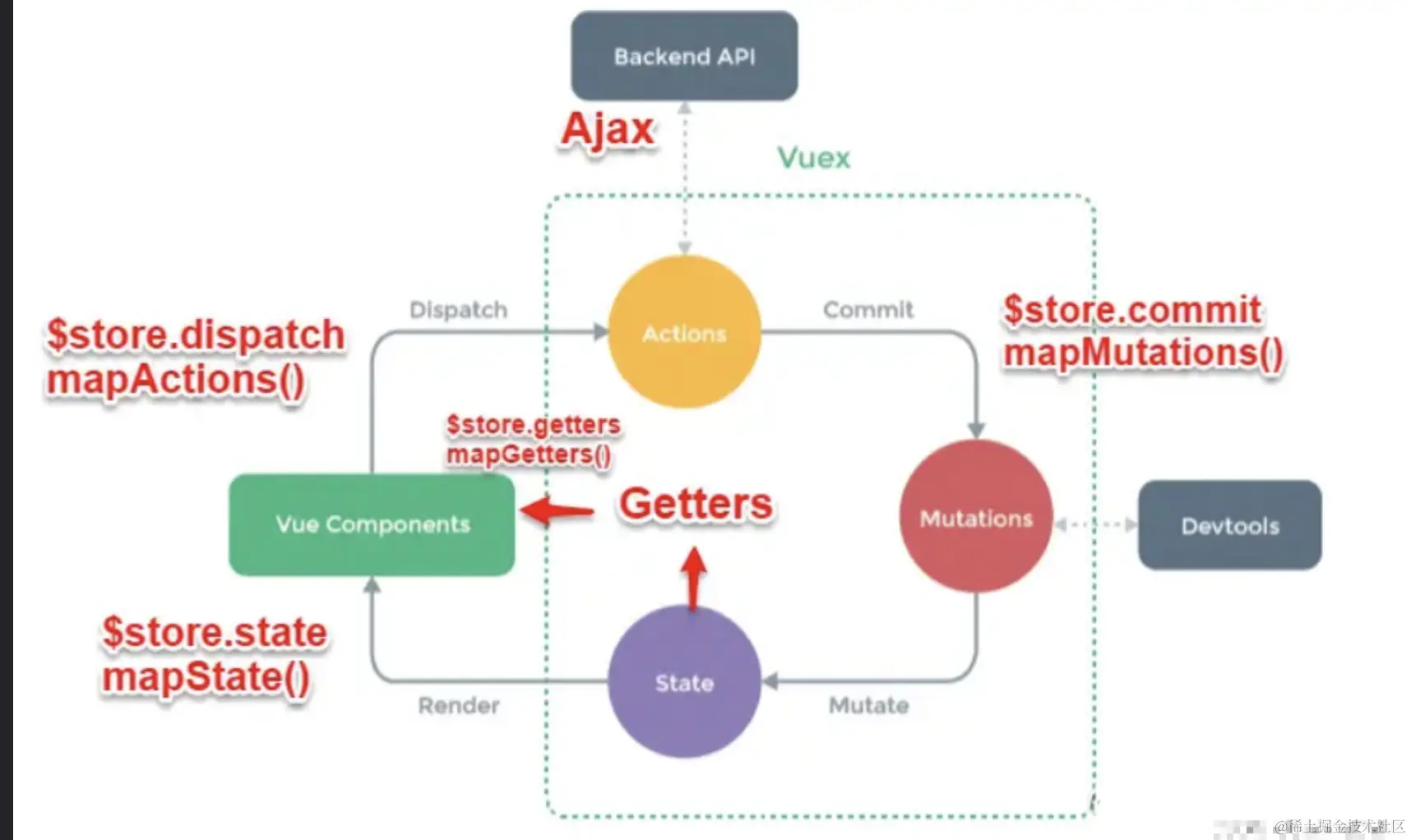
👉 参数解释
js
1. Vue 组件 (Vue Components)
Vue 组件负责接收用户的交互操作(如点击、输入等)。
当用户进行操作时,组件会执行 dispatch 方法,触发对应的 action 以进行响应
js
2. dispatch
dispatch 是触发操作行为的方法。
它是唯一能执行 action 的方法,用于触发 store 中的操作
js
3. actions
actions 是用于处理操作行为的模块。
它通过 this.$store.dispatch('action 名称', data1) 来触发。
触发后,commit() 被用来触发 mutation 的调用,进而间接更新 state。
actions 负责处理 Vue 组件接收到的所有交互行为,支持同步和异步操作。
支持多个同名的 action 方法,它们会按照注册的顺序依次触发。
它是执行后台 API 请求、触发其他 action 或提交 mutation 的地方。
提供了 Promise 封装,以支持 action 的链式调用
js
4. commit
commit 是执行状态改变操作的方法。
它是唯一能执行 mutation 的方法,用来提交 mutation。
用于触发 mutation 来更新 Vuex 的 state。
js
5. mutations
mutations 是修改 state 的操作方法。
它是唯一推荐修改 state 的方式,只能执行同步操作。
mutation 方法名必须全局唯一。
mutations 中可以有一些钩子函数,用来监控 state 的变化等操作
js
6. state
state 是页面状态管理的容器对象。
它集中存储 Vue 组件中的所有数据,作为全局唯一的状态管理对象。
页面显示所需的数据都从 state 中读取,借助 Vue 的响应式机制实现高效的状态更新。
js
7. getters
getters 是用于读取 state 的方法。
它通过定义的方式获取全局 state 中的值,并在 Vue 组件中使用。
在这段话中,getters 被认为是包含在 render 中的,但它们主要用于从 state 中提取数据。

```:


### 4、`$attrs`/`$listeners`

attrs和listeners提供了一种简洁的方式来传递父组件的属性和事件,不需引入Vuex

无需进行复杂数据处理时可以有效简化多级组件嵌套中的数据传递逻辑

```JS
1. Vuex用于多级组件嵌套数据传递:
通常Vuex用来处理跨组件或多级组件间共享数据

只是传递数据而不进行复杂的状态管理,Vuex则会显得过于复杂
JS
2. attrs:
定义:attrs 包含了父组件中没有被 props 接受的所有特性绑定,常见的包括 class、style 之外的其他属性

使用场景:当一个组件没有声明任何 prop 时,attrs 会自动收集父作用域中传递的所有绑定,除了 class 和 style

传递方法:你可以通过 v-bind="attrs" 将这些属性传递到子组件中。

配合 inheritAttrs 使用

:inheritAttrs 默认值为 true,表示 Vue 会将父组件的 attrs 自动绑定到子组件的根元素。

如果设置为 false,则需要手动通过 v-bind="attrs" 来传递。
JS
3. listeners:
定义:listeners 包含了父组件中传递的 v-on 事件监听器(不含 .native 修饰符)。
使用场景:listeners 收集的是父组件传递的事件监听器,可以通过 v-on="listeners" 将事件传递给子组件。
传递事件:子组件可以通过 v-on="listeners" 绑定事件监听器,允许子组件在合适的时机触发父组件的事件。
JS
4. 配合 inheritAttrs 选项:
功能:inheritAttrs选项控制是否自动将父组件的 attrs 绑定到子组件的根元素。

如果希望手动控制 attrs 的传递(例如不希望它自动绑定到子组件的根元素)
可以将 inheritAttrs 设置为 false,并通过 v-bind="attrs" 手动传递。
js
// index.vue
<template>
  <div>
    <h2>lintaibai</h2>
    <child-com1
      :foo="foo"
      :boo="boo"
      :coo="coo"
      :doo="doo"
      title="前端"
    ></child-com1>
  </div>
</template>
<script>
const childCom1 = () => import("./childCom1.vue");
export default {
  components: { childCom1 },
  data() {
    return {
      foo: "Javascript",
      boo: "Html",
      coo: "CSS",
      doo: "Vue"
    };
  }
};
</script>

// childCom1.vue
<template class="border">
  <div>
    <p>foo: {{ foo }}</p>
    <p>childCom1的$attrs: {{ $attrs }}</p>
    <child-com2 v-bind="$attrs"></child-com2>
  </div>
</template>
<script>
const childCom2 = () => import("./childCom2.vue");
export default {
  components: {
    childCom2
  },
  inheritAttrs: false, // 可以关闭自动挂载到组件根元素上的没有在props声明的属性
  props: {
    foo: String // foo作为props属性绑定
  },
  created() {
    console.log(this.$attrs); // { "boo": "Html", "coo": "CSS", "doo": "Vue", "title": "前端工匠" }
  }
};
</script>
————————————————————————————————————————————————————————————————————————————————
// childCom2.vue
<template>
  <div class="border">
    <p>boo: {{ boo }}</p>
    <p>childCom2: {{ $attrs }}</p>
    <child-com3 v-bind="$attrs"></child-com3>
  </div>
</template>
<script>
const childCom3 = () => import("./childCom3.vue");
export default {
  components: {
    childCom3
  },
  inheritAttrs: false,
  props: {
    boo: String
  },
  created() {
    console.log(this.$attrs); // { "coo": "CSS", "doo": "Vue", "title": "前端工匠" }
  }
};
</script>
————————————————————————————————————————————————————————————————————————————————
// childCom3.vue
<template>
  <div class="border">
    <p>childCom3: {{ $attrs }}</p>
  </div>
</template>
<script>
export default {
  props: {
    coo: String,
    title: String
  }
};
</script>
JS
上图所示attrs表示没有继承数据的对象,格式为属性名:属性值。

Vue2.4提供了attrs表示没有继承数据的对象,格式为{属性名:属性值}。

Vue2.4提供了attrs表示没有继承数据的对象,格式为属性名:属性值。

Vue2.4提供了attrs , $listeners 来传递数据与事件,跨级组件之间的通讯变得更简单。
JS
简单来说:attrs与attrs与attrs与listeners 是两个对象

attrs里存放的是父组件中绑定的非Props属性,
listeners里存放的是父组件中绑定的非原生事件。
5、provide/inject
Vue2.2.0新增API,需要一起使用,以允许一个祖先组件向其所有子孙后代注入一个依赖,不论组件层次有多深,并在起上下游关系成立的时间里始终生效
一言而蔽之:祖先组件中通过provider来提供变量,然后在子孙组件中通过inject来注入变量
provide / inject API 主要解决了跨级组件间的通信问题,不过它的使用场景,主要是子组件获取上级组件的状态,跨级组件间建立了一种主动提供与依赖注入的关系。
js
// A.vue
export default {
  provide: {
    name: '太'
  }
}
-------------------------------------------
// B.vue
export default {
  inject: ['name'],
  mounted () {
    console.log(this.name);
  }
}
JS
可以看到,在 A.vue 里,我们设置了一个 provide: name,值为 浪里行舟,它的作用就是将 name 这个变量提供给它的所有子组件。而在 B.vue 中,通过 inject 注入了从 A 组件中提供的 name 变量,那么在组件 B 中,就可以直接通过 this.name 访问这个变量了,它的值也是 浪里行舟。这就是 provide / inject API 最核心的用法。

需要注意的是:provide 和 inject 绑定并不是可响应的。这是刻意为之的。然而,如果你传入了一个可监听的对象,那么其对象的属性还是可响应的----vue官方文档 所以,上面 A.vue 的 name 如果改变了,B.vue 的 this.name 是不会改变的,仍然是
provide与inject 怎么实现数据响应式
一般来说,有两种办法:
JS
provide祖先组件的实例,然后在子孙组件中注入依赖,这样就可以在子孙组件中直接修改祖先组件的实例的属性,不过这种方法有个缺点就是这个实例上挂载很多没有必要的东西比如props,methods 使用2.6最新API Vue.observable 优化响应式 provide(推荐) 我们来看个例子:孙组件D、E和F获取A组件传递过来的color值,并能实现数据响应式变化,即A组件的color变化后,组件D、E、F会跟着变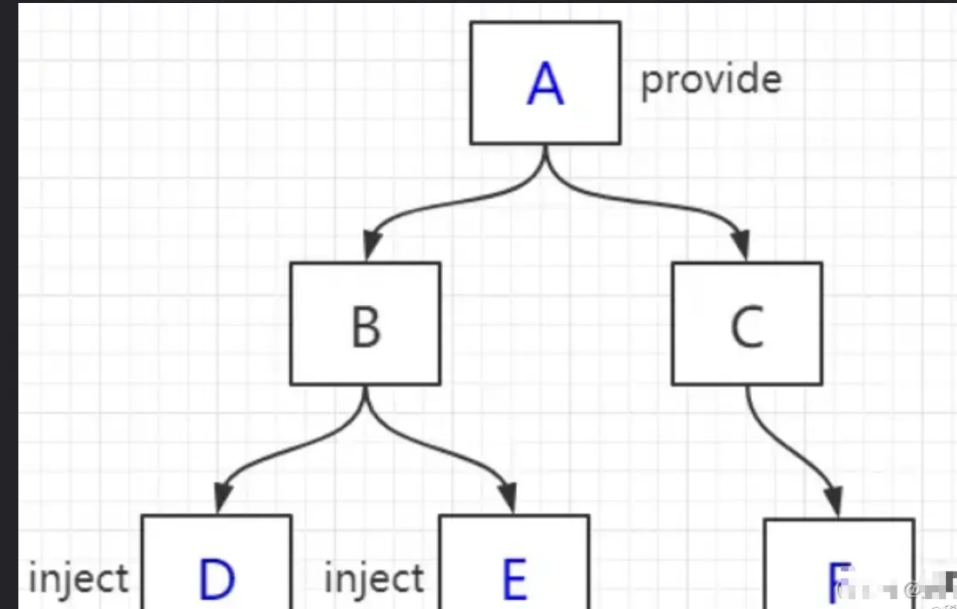
js
// A 组件
<div>
      <h1>A 组件</h1>
      <button @click="() => changeColor()">改变color</button>
      <ChildrenB />
      <ChildrenC />
</div>
......
  data() {
    return {
      color: "blue"
    };
  },
  // provide() {
  //   return {
  //     theme: {
  //       color: this.color //这种方式绑定的数据并不是可响应的
  //     } // 即A组件的color变化后,组件D、E、F不会跟着变
  //   };
  // },
  provide() {
    return {
      theme: this//方法一:提供祖先组件的实例
    };
  },
  methods: {
    changeColor(color) {
      if (color) {
        this.color = color;
      } else {
        this.color = this.color === "blue" ? "red" : "blue";
      }
    }
  }
  // 方法二:使用2.6最新API Vue.observable 优化响应式 provide
  // provide() {
  //   this.theme = Vue.observable({
  //     color: "blue"
  //   });
  //   return {
  //     theme: this.theme
  //   };
  // },
  // methods: {
  //   changeColor(color) {
  //     if (color) {
  //       this.theme.color = color;
  //     } else {
  //       this.theme.color = this.theme.color === "blue" ? "red" : "blue";
  //     }
  //   }
  // }
————————————————————————————————————————————————————————————————————————————————
// F 组件
<template functional>
  <div class="border2">
    <h3 :style="{ color: injections.theme.color }">F 组件</h3>
  </div>
</template>
<script>
export default {
  inject: {
    theme: {
      //函数式组件取值不一样
      default: () => ({})
    }
  }
};
</script>
虽说provide 和 inject 主要为高阶插件/组件库提供用例,在业务中熟练运用可以达到事半功倍的效果
6、 ref
parent/parent / parent/children与 ref ref:如果在普通的 DOM 元素上使用,引用指向的就是 DOM 元素
如果用在子组件上,引用就指向组件实例 parent/parent / parent/children:访问父 / 子实例
需要注意的是:这两种都是直接得到组件实例,使用后可以直接调用组件的方法或访问数据。我们先来看个用 ref来访问组件的例子
js
// component-a 子组件
export default {
  data () {
    return {
      title: 'Vue.js'
    }
  },
  methods: {
    sayHello () {
      window.alert('Hello');
    }
  }
}
————————————————————————————————————————————————————————————————————————————————
// 父组件
<template>
  <component-a ref="comA"></component-a>
</template>
<script>
  export default {
    mounted () {
      const comA = this.$refs.comA;
      console.log(comA.title);  // Vue.js
      comA.sayHello();  // 弹窗
    }
  }
</script>
————————————————————————————————————————————————————————————————————————————————
// 不过,这两种方法的弊端是,无法在跨级或兄弟间通信
// parent.vue
<component-a></component-a>
<component-b></component-b>
<component-b></component-b>
想在 component-a 中,访问到引用它的页面中(这里就是 parent.vue)的两个 component-b 组件,那这种情况下,就得配置额外的插件或工具了,比如 Vuex 和 Bus 的解决方案
❤vue3组件通信
props 和 emit
- 简介
JS
  Props是Vue3中最常见的组件间传值方式
  在父组件中定义Props将其传递给子组件
  子组件就可以访问这些数据了

  通过 `props` 向子组件传递数据,通过 `$emit` 向父组件发送事件
  可以确保数据流动的单向性和组件之间的解耦
父子组件传值
父子组件传值:父组件向子组件传值(props),子组件向父组件传值(emit)
无setup语法糖写法(Vue版本3.3 之前)
👉 父组件
js
// 1、引入子组件
import JMsUploadps  from './JMsUploadps.vue';

//2、在父组件上定义同名方法接收
//同名事件
<JMsUploadps  @sendImg="sendImg($event,val)" ></JMsUploadps>

//3、父组件接收方法的参数为子组件传递的参数
function sendImg(e,row){
   console.log(e,row);
   console.log('我是子组件传递给父组件的数据');
}
👉 子组件
1、定义
emits,emits的定义是与component、setup等这些属性是同级
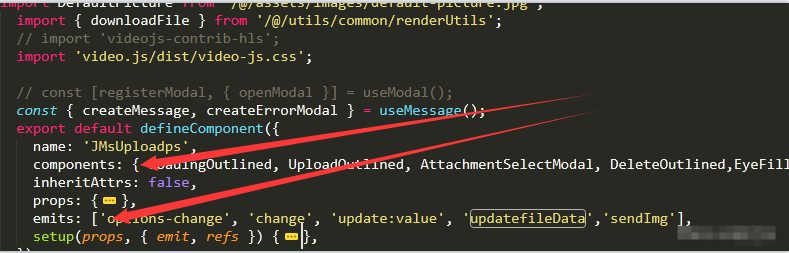
emits此时是作为数组,它也可以接收一个对象2、使用
js
setup(props, { emit, refs }) {
    emit('addImg', '参数');
}
有时候需使用ctx.emit,其中ctx是setup中第二个参数,也就是上下文对象
bash
setup(props,ctx) {
  ctx.emit('addImg', '参数');
}
👉完整案例(无setup语法糖)
js
// 父组件ChildComponent.vue
<template>
  <ChildComponent :data="parentData" @childEvent="handleChildEvent" />
</template>
<script>
import { ref } from 'vue';
import ChildComponent from './ChildComponent.vue';

export default {
  components: { ChildComponent },
  setup() {
    const parentData = ref('some data');
    function handleChildEvent(message) {
      console.log('Event received from child:', message);
    }

    return {
      parentData,
      handleChildEvent
    };
  }
};
</script>

// 子组件 传统写法(Options API + setup)
<template>
  <div>
    <p>Received from parent: {{ data }}</p>
    <button @click="sendEventToParent">Send event to parent</button>
  </div>
</template>

<script>
export default {
  props: {
    data: {
      type: String,
      required: true
    }
  },
  emits: ['childEvent'],
  methods: {
    sendEventToParent() {
      this.$emit('childEvent', 'Hello from child!');
    }
  }
};
</script>
setup语法糖的使用(Vue版本3.3 以后)
👉父组件
javascript
<template>
  <commentdialog ref="mychild1" @sendSubmit="handlesendSubmit"></commentdialog>
</template>

<script setup>
import { ref } from 'vue';
import commentdialog from '@/views/admin/comment/commentdialog.vue';

// 引用子组件
const mychild1 = ref(null);

// 调用子组件方法
function openDialog(row) {
  console.log(row);
  if (mychild1.value) {
    mychild1.value.openDialog(1);
  }
}

// 处理 sendSubmit 事件
function handlesendSubmit() {
  // 处理 sendSubmit 事件
}
</script>
👉子组件
js
<template>
  <div>
    <!-- 子组件的内容 -->
    <p>Dialog content goes here</p>
    <button @click="openDialog(1)">Open Dialog</button>
  </div>
</template>

<script setup>
import { defineExpose } from 'vue';

// 子组件方法
function openDialog(id) {
  console.log('Dialog opened with id:', id);
  // 这里可以处理打开 dialog 的逻辑
}

// 暴露 openDialog 方法给父组件
defineExpose({
  openDialog
});
</script>
👉 完整示例
🔺父组件
javascript
//父组件
//方式二 setup方式  Vue版本3.3 之后
<template>
  <ChildComponent ref="CustomerDialogRef"   @childEvent="handleChildEvent" />
</template>
<script setup>
import { ref } from 'vue';
import ChildComponent from './ChildComponent.vue';
const CustomerDialogRef = ref(null);
function handleChildEvent(message) {
    console.log('Event received from child:', message);
    CustomerDialogRef.value.handleOpen();
  }
};
</script>
🔺子组件
js
<template>
  <button @click="notifyParent">Notify Parent</button>
</template>
<script>
import { defineComponent, toRefs } from 'vue';
export default defineComponent({
  props: {
    data: String
  },
  setup(props, { emit }) {
    const { data } = toRefs(props);
    function notifyParent() {
      emit('childEvent', 'message from child');
    }
    return {
      data,
      notifyParent
    };
  }
});
</script>
Provide/Inject 传参
Vue3中提供了一种高级的组件间传值方式。它允许祖先组件向后代组件注入数据,而不需要显式地将数据传递给中间组件
使用 provide 和 inject
provide 和 inject 用于在组件树中共享数据,适用于多层级的组件传递。
👉 父子组件传值
🔺父组件:
js
<template>
  <ChildComponent />
</template>
<script>
import { provide } from 'vue';

export default {
  setup() {
    provide('sharedData', 'some value');
  }
};
</script>
🔺子组件:
js
<template>
  <p>Injected Data: {{ injectedData }}</p>
</template>
<script>
import { inject } from 'vue';

export default {
  setup() {
    const injectedData = inject('sharedData');

    return {
      injectedData
    };
  }
};
</script>
ref传参(甚为喜欢)
父组件使用子组件方法
方法一定要在子组件暴露出来
dart
//父组件发送
import jidijiangshi from "@/views/jidi/jidijiangshi.vue";
<jidijiangshi ref="mychild1" @sendSubmit="handlesendSubmit"></jidijiangshi>

const mychild1 = ref()
mychild1.value.queryfromParent();


//父组件接受
const handlesendSubmit=(row)=>{
    console.log(row,'输入到A组件');
}
子组件向父组件传值和方法
javascript
//子组件
import { ref, watch,defineEmits } from 'vue'
const emit=defineEmits(['sendSubmit'])

// 子组件
// 子组件-父元素过来
const queryfromParent = (row)=>{
    console.log('子元素2')
}
// 确认
const handelSubmit = () => {
    emit('sendSubmit','222222');
}


//不会暴露任何在 <script setup> 中声明的绑定。defineExpose可以将方法主动暴露出来
defineExpose({
    queryfromParent,
})
使用 refs 访问子组件实例
在Vue 3中,$parent 属性被移除,因为 Vue 3 引入了 Composition API,这使得组件间的通信和状态管理变得更加明确和模块化。
$parent 在 Vue 2 中用于访问父组件实例,但在 Vue 3 中推荐使用其他方法来实现组件间的通信。
在vue2之中我们使用的ref和parent废弃了,使用vue2的时候会提示我们
$parent is not defined
通过 ref 获取子组件实例并访问其方法或数据。
🔺父组件:
js
<template>
  <ChildComponent ref="childRef" />
  <button @click="callChildMethod">Call Child Method</button>
</template>
<script>
import { ref } from 'vue';
import ChildComponent from './ChildComponent.vue';

export default {
  components: { ChildComponent },
  setup() {
    const childRef = ref(null);

    function callChildMethod() {
      if (childRef.value) {
        childRef.value.childMethod();
      }
    }
    return {
      childRef,
      callChildMethod
    };
  }
};
</script>
🔺子组件
js
<script>
import { defineComponent } from 'vue';
export default defineComponent({
  methods: {
    childMethod() {
      console.log('Method in child called,我是子组件');
    }
  }
});
</script>
❤ 错误分析
(1)Component emitted event "addImg" but it is neither declared in the emits option nor as an "onAddImg" prop.
父组件上定义同名方法与子组件上的emit 提交方法名不一致